![EMS_Logo.png]](https://help.ems.info/hs-fs/hubfs/EMS_Logo.png?height=40&name=EMS_Logo.png)
We want to offer our customers full transparency and the best possible cooperation and interaction with the EMS agents.
To this end, we have set up the EMS customer portal, which can be accessed via the following website address: https://ticket.ems.info/helpdesk
Existing users can log in there and new users can register by clicking on “Register here” register.
General Overview
Once logged in, the user receives an overview of all their ticket requests that have been created so far under the known channels.
Note ❗: As a user, you only ever see the tickets that you have created yourself. It is not possible to view the cases of other team colleagues.
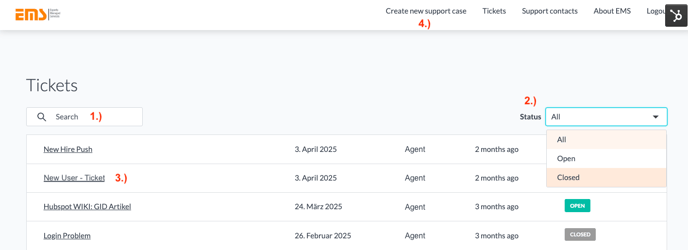
| 1. | Keyword search across all inquiries |
| 2. | Status of open or solved tickets |
| 3. | Title of the ticket (click to go to the ticket details) |
| 4. | Form for creating a new request |
Each ticket listed there is clickable within the line. After clicking, the user is taken to the ticket details:
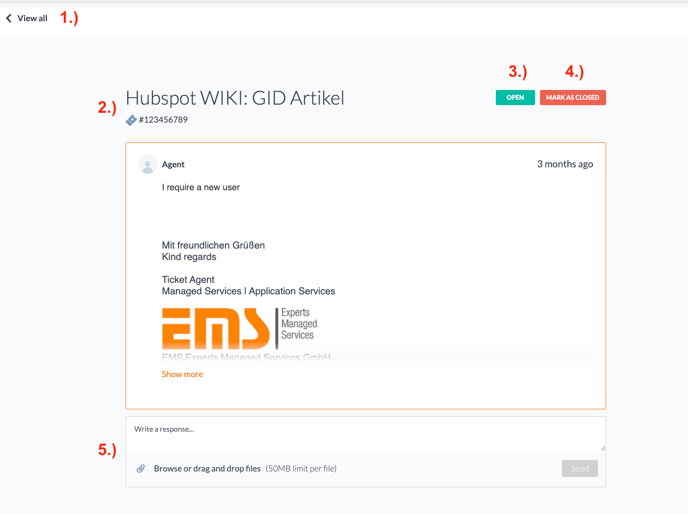
| 1. | Navigation back to overview |
| 2. | Title and ID of opened ticket |
| 3. | Current status |
| 4. | Button for own closing if request is no longer relevant |
| 5. | Reply area with upload function to get in touch with the ticket agent. |
If you have any further questions about using our EMS customer portal, please contact support@ems.info at any time.